Captions On or Off? Choose by the Film and the Room
Choose captions for a film by weighing dialogue density, room noise and reading comfort, so you can follow the scene without distracting from it.
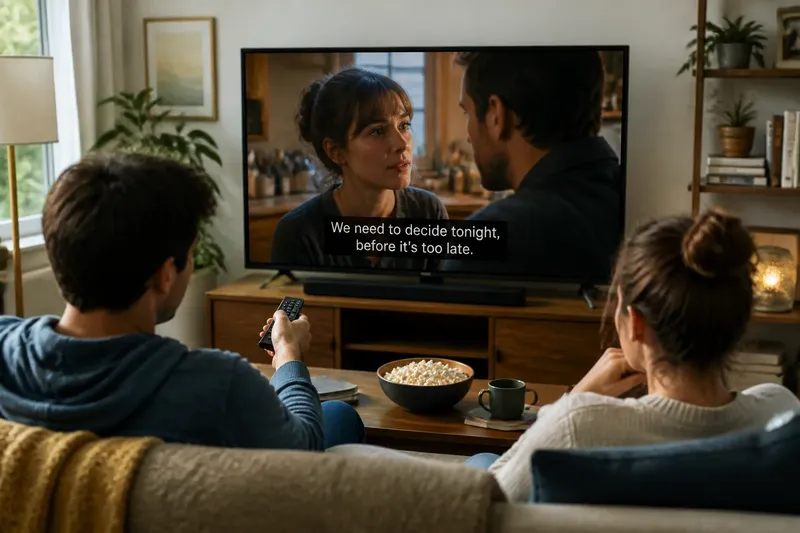
Should you watch this film with captions on or off? Captions are useful when dialogue is hard to catch, but they can also draw your eyes away from faces, movement and visual detail. The best choice depends on the film, the room and how you prefer to watch—not on a rule that applies to every screening.
Try to identify what is making a scene difficult before changing settings. A missed line may come from background noise, rapid exchanges, an unfamiliar accent or a deliberate stretch of quiet speech. Each calls for a slightly different response, and you can switch captions on or off as the film changes.
Start with the reason a line is getting lost
If dialogue is dense, captions can help you keep track of names, relationships and quick changes of subject. They are especially useful when several characters speak in succession or a line carries information the next scene depends on. If the film communicates that moment clearly through action or expression, you may prefer to stay with the image instead.
Room distractions are a separate problem. A conversation nearby, a humming appliance or traffic outside can mask speech even when the film’s mix is easy to hear in a quieter room. Captions can preserve the words, but they do not remove the interruption itself. If possible, reduce the noise or pause until you can give the scene your attention.
Personal preference matters, too. Some viewers find reading captions effortless; others find that they miss facial reactions while scanning text. Neither response is a failure to watch properly. Choose the setting that helps you stay with the story rather than the one you think you ought to use.
Captions can clarify speech but compete with the image
With captions on, you can confirm a phrase you did not catch and follow dialogue delivered quickly or quietly. Captions may also identify a speaker or describe a meaningful sound, depending on the version available. That extra information can make a confusing exchange easier to follow.
The trade-off is attention. Text appears in a fixed part of the frame, while a film may place important action elsewhere. During a scene built around a glance, a change in posture or movement across the background, reading every line can pull your focus down from the detail that carries the moment.
Captions can also affect pacing. A long line may remain on screen while characters are silent, or a short line may disappear before you have finished looking at the scene. If the text feels more distracting than helpful, try a different caption setting if available, or turn it off for a stretch and see whether the dialogue remains clear.
Watching without captions can make room for visual detail
Without captions, your eyes are free to move around the frame. That can make it easier to notice who reacts to a line, where a character is looking or how the setting changes during a conversation. Films with sparse dialogue, clear speech and strong visual storytelling may be easier to enjoy this way.
The drawback is that a single missed line can leave a gap. If you catch yourself guessing what was said or losing track of who knows what, turn captions on for the next exchange. You do not need to replay every missed sentence or keep captions on for the whole film once they have served their purpose.
When should you switch captions on?
What if a room is noisy?
Reduce the distraction if you can, then use captions if speech is still masked. For a temporary interruption, captions may help you follow the scene without making a permanent choice for the rest of the film.
What if several people speak quickly?
Turn captions on when the exchange becomes difficult to track, especially if you are mixing up speakers or missing important names. Switch them off again if reading starts to distract from the scene.
What if captions cover something important?
Look for a caption position, size or style setting that suits the screen, if one is offered. If the text still draws your eye away, try watching that section without captions and use them again when dialogue becomes harder to follow.
What if you simply prefer reading along?
Keep captions on if they make watching more comfortable. You do not need to justify a preference by pointing to a noisy room or difficult dialogue.
Make a small adjustment before changing everything
When a line is hard to hear, first check whether the room is the main obstacle. Move away from a distracting noise, close a door if that is easy, or pause while someone nearby finishes speaking. If you are using a television or streaming app, a dialogue-focused sound mode may be available; check the device and programme options rather than assuming every system labels or handles it the same way.
If the words remain unclear, enable captions for the part that is giving you trouble. On many players, the caption control is available from the playback menu. You can then judge whether the added text helps you follow the scene or makes you miss too much of the image.
Say you are watching a family drama in a living room where people are talking quietly nearby. You turn captions on for a rapid kitchen conversation, catch the names and decisions that were difficult to hear, then switch them off when a silent exchange of looks begins. The useful result is not a perfect setting for the whole film, but a choice that follows the changing demands of the scene.
Do not spend the film chasing perfect caption settings
It is rarely worth pausing repeatedly to fine-tune text for every scene. If the captions are readable and not obscuring the action, start watching. Make another adjustment only when a real problem appears: unreadable text, missed dialogue, or a frame that is difficult to follow.
Check the available caption options before you settle in if you already know you need a particular language or text style. The exact controls depend on the player and the caption track. For a one-off issue, though, a quick switch is often more helpful than a prolonged settings search.
Choosing captions on or off is a viewing decision, not a test of attention. Use them when the dialogue or room makes words difficult to follow, and leave them off when they pull your focus away from the film. For the next screening, notice which scenes benefit from each choice; that is a more useful guide than committing to one setting for every movie.